A native macOS IDE with the terminal at its heart. Run agents, servers, and tests across multiple projects and isolated workrooms, then review the work without leaving the app.
macOS 15+ · Apple silicon + Intel
What you get
01 / 18
Terminals that outlive the app
Quit, reopen, and your shells are still running: same directory, same scrollback, same agent mid-conversation. A session left without a tab waits in the background — bring it back into any tab, or stop it.
02 / 18
A terminal that explains its own failures
When a command fails, get a plain-language reason and one suggested fix — handed to you to review, never run behind your back. Risky commands are flagged; obvious secrets never reach the agent.
03 / 18
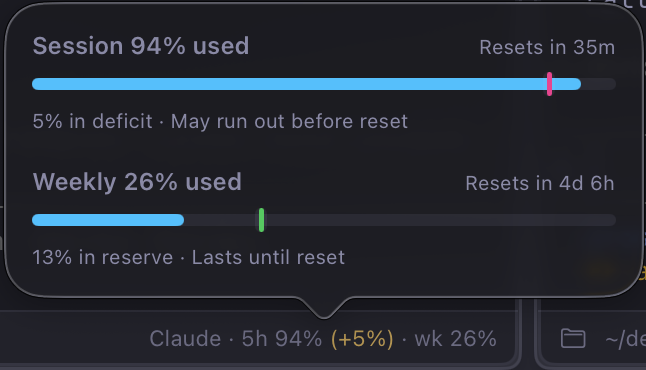
Agent usage and burn rate, always visible
Remaining quota, spend rate and reset time sit in the terminal footer. You find out you're running low while you can still plan around it.
04 / 18
Real parallel working copies
Every workroom is a separate copy of your project on disk with its own branch or bookmark. No stashing, no switching, nothing to tidy up first.
05 / 18
Split anything against anything
Drag a workroom from the sidebar and drop it beside another to share the window — they needn't be the same project. Splits nest, each pane keeps its own tabs and toolbar, and terminals split again inside any of them.
06 / 18
Git and Jujutsu, both first class
A real interface for Jujutsu — bookmarks, changesets, divergence — not Git with jj bolted on. What Workroom reports always matches your VCS.
Also in the box
12 more
- session-login ‹ …docs-site · tok…
Switch by what you were just doing
⌥Tab for workrooms, ⌃Tab for panes, in recency order.
See what's busy
Tabs and sidebar rows animate while a command runs.
Notifications you can act on
Unread counts on the tab, project, Dock and menu bar.
Review the work in the app
Changes, history, changeset detail, unified or side-by-side diffs.
- ↑1 ↓0 feature/…[ Commit ]
Commit and sync without leaving
Commit from the changes panel; ahead and behind at a glance.
Pull requests and CI
Open, review, merge — merge, squash or rebase.
- app/models/user…README.md · pre…
Read files without leaving
Syntax highlighting, Markdown preview, in-file find.
A Run command per project
Launch it into its own tab, see how it exited.
- ✓ bundle install▸ yarn install …
Setup and teardown that run themselves
New workrooms prepare themselves behind a progress view.
- ■ Tokyo Night□ Solarized Lig…
Themes worth switching for
58 families, ~120 variants, light and dark each.
- ⌥§ · quick terminal~ %
A quick terminal, anywhere
⌥§ drops a shell over whatever you were doing; again to hide it, still running.
- ⌘T new terminal⌘§ show Workroom
Keyboard-first, and it teaches you
⌘1–⌘9, ⌘T, ⌘B, and a global ⌘§ to show Workroom from anywhere.
But what is Workroom?
Workroom is a native macOS IDE with the terminal at its heart. We believe the terminal is now the best interface for developers, and that it should be the center of your development environment. The terminal is where the magic happens — it's where your agents live, your servers and tests run, and where you review and commit your code.
Workroom also embraces agentic development, where you can have multiple agents working on different bugs, chores, or features at the same time, or even on different projects. Give each agent its own workroom, with its own terminal and its own context, so you can work on multiple projects and branches at the same time without losing context. You can even work on multiple projects in a single split view.
Make room for the next task.
Download v2.1.0, the latest release, for macOS 15 or later on Apple silicon + Intel.